Jack Neubart gets a taste of a sweet compact 12.4 MP CMOS APS-C DSLR with a suite of features.
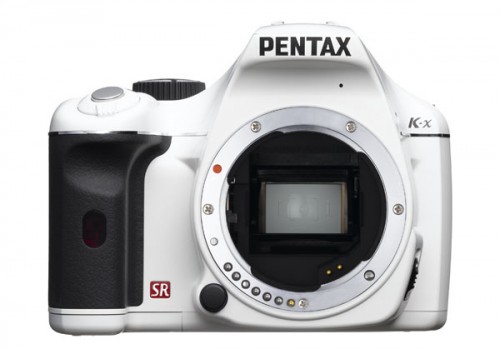
I approach each new camera with a degree of skepticism. Unlike many out there, I’m not as easily swayed by all the media hype and promotional gobbledygook. I’m from Brooklyn and we need to see that something actually works. So when the Pentax K-x arrived, I looked at it, pleased that they sent me the “white” version, only because it reminded me of the Imperial Storm Troopers from Star Wars (would have been a great fit). I unpacked everything, mated the lens to the K-x body, installed the lithium batteries that came in the box, then added my own SDHC card-none included (also takes standard SD-but why hamper the machine out of the gate!). And I started to play with it.
Hmm, not bad, I thought. But let’s see how it performs in the real world. So, intrepid explorer that I am, I ventured outside. It may not be a tropical rain forest, but it is an urban jungle out there rife with photographic opportunities. I was ready for bear (good luck finding one of those in Brooklyn, but you get my drift) and I headed straight for my favorite city park.
Here Kit-ty
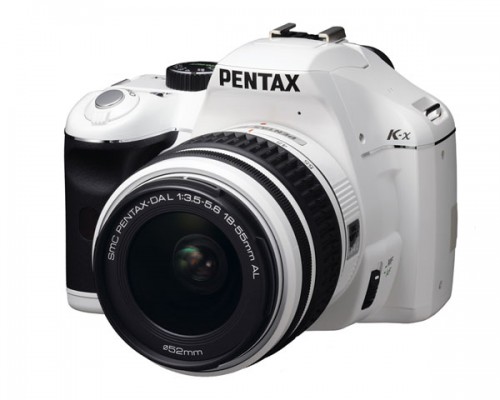
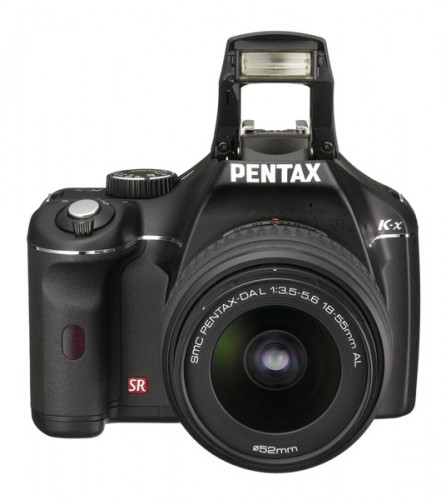
By the way, not only is the camera white (with contrasting black touches), but so is the matching SMC Pentax DAL f/3.5-5.6 18-55mm AL kit lens. The camera also comes in red or blue. (Not sure how I would have felt about it in red or blue, but I know I’m happier with this one.) And for the traditionalist, there’s always the standard black version. Other lenses from Pentax are the traditional black tone.
The basic one-lens kit is priced very reasonably (under $650 street), but if you’re willing to spend a bit more, you can up the ante and add a 50-200 or 55-300 zoom to the deal ($750 and $850, respectively)-and still get a great bargain. That means you’ll be ready to shoot landscapes, portraits, and, with the longer lenses, wildlife (such as that bear we alluded to earlier). (Don’t forget to multiply focal length by the APS-C sensor factor: 1.5X, to arrive at the effective focal length. That’s especially important when determining a usable range of values under low lighting conditions, with the camera’s in-body image stabilizer.)


What’s even more amazing about this camera, at this price, is that you don’t have to settle for a smaller sensor, such as Micro/Four Thirds. OK, granted, perhaps it is not as small as some of the latest Micro Four Thirds sub-compacts now out there (the built-in optical viewfinder and reflex housing/mirror account for that), but it is small and light enough to wear around your neck without complaint on a hot, humid day while hiking around St. John USVI.
On the Surface
The K-x has a nicely contoured, textured grip, although the back, particularly under the thumb rest, is on the smooth side. Not having used the camera in a humid clime, hard to say if that would affect anything, but I doubt it.
All the camera controls on the K-x are neatly arrayed, with all but one-the flash popper-upper/delete button-situated conveniently on the right side, including the lens release. Granted, I’m more used to having a lens release on the left, because otherwise your fingers tend to get tangled, but you get used to it. What I found a bit disconcerting was combining the flash and delete buttons in one. But this too, is something you get used to before long.
Well, there is one other function located separately. As expected, the diopter correction is situated adjacent to the optical finder-actually rides atop it. And it’s a slider that lacks the fine-tuning you may be used to on more robust DSLRs. Still, this did not prove to be a problem.
So, when do I start griping and grumbling and tell you what I really think? Well, I hate to disappoint, but you won’t find too much of that here. This little camera truly surprised me. Okay, there are some things I wasn’t overly thrilled with, and we’ll get to them in due time. Be patient.
The Interface
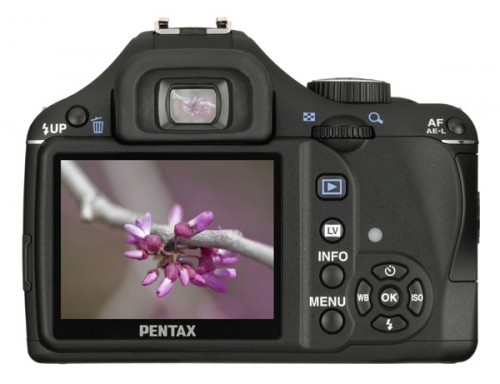
Camera manufacturers are beginning to understand that we, at any level of expertise, and especially eyeglass wearers like myself (who hate putting on glasses just to read an LCD panel), like having the information up front-or in back, to be precise, on that large color monitor-and in large type, with maybe some graphics thrown in. The K-x entirely bypasses a top-panel vanilla data panel in favor of the rear and fairly sizable color monitor, which is bright and fairly easy to see even outdoors, except under direct sunlight (so you duck under the shade-no biggie). As soon as you turn the camera on, you see the operating/shooting mode boldly emblazoned on the LCD, which is also true when switching from one to the next. Need the date and time? It’s there also-and very readable.
Practically every button serves a key function. There’s no confusing array back here-just the meat and potatoes that you need to capture that image.
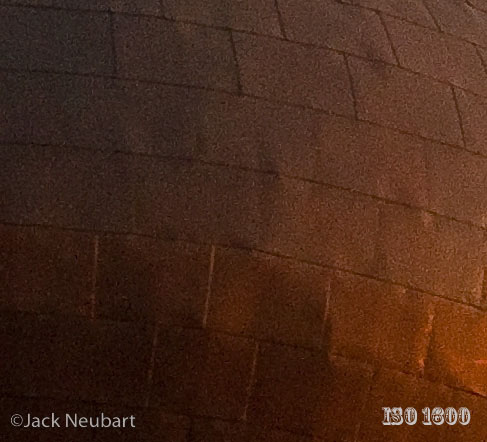
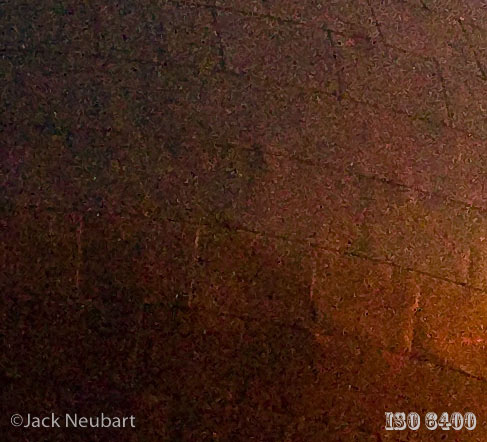
The thumbwheel is where it should be, falling directly beneath your thumb. And there is only one such wheel, which leads to less confusion. What’s more, it’s sensitive to the shooting mode when in shutter-priority, aperture-priority, and sensitivity-priority modes. Yes, folks, this is a camera that has had sensitivity training-about time! Well, not really, since I don’t know anyone who would choose this option when there’s a chance of getting grainy images as a result. But stay tuned, there’s more ground to cover before we discuss the fineness of our coffee grounds.
Getting back on track, in manual mode, you have to hit the AV (+/-) button on top to shift between shutter speed and aperture settings. Next to that button is a button with a green dot that you define. Unfortunately, I have no idea what I set it for (Ain’t that always the way it is with custom functions?).
Two buttons to the immediate right of the LCD (next to the cursor buttons) are Info and Menu. If the camera settings are not displayed, hit the Info button once to show them, twice to get to a screen with a broader spectrum of parameters. Between this screen and the dedicated buttons can be found all the essential control settings you’ll need. You may note a few parameters grayed out/off. These apply only to JPEG captures. If the camera is set for RAW or RAW+JPEG capture, these functions become unavailable. So how do you get around this? Set the green button to switch from one to the other. Hey, now I remember what I’m using that button for! (Just remember to hold it down for a second.) And so that I don’t leave you in a lurch, let’s turn to some of the more interesting functions you get with the K-x.
Picture and Scene Modes
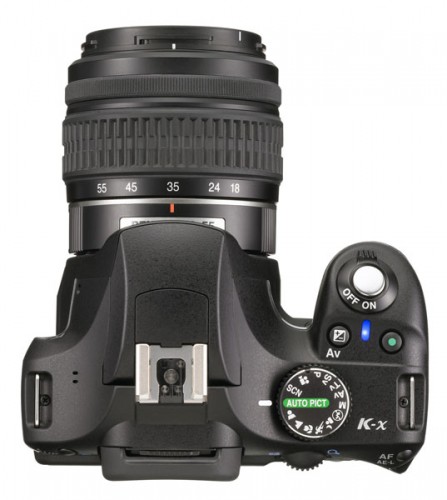
The Pentax K-x has a dedicated Auto Pict setting on the mode dial. You wanted some gripes? Here it comes. This mode makes absolutely no sense to me at all. I point it around my office/studio and it gives me readings ranging from face detection (pointed at a chair) to a runner to a scenic view. The flash doesn’t automatically pop up unless set to Auto; user overrides, however, remain in place. So what is it doing? I haven’t a clue.
Now, let’s skip past this auto setting and move to the specifically defined picture modes, which are supposedly “auto” with a purpose. Here, by hitting the Info button, we can see which parameters have been tweaked, although, again, all subject to user overrides such as exposure compensation, ISO, and flash. And there appears to be no rhyme or reason for the settings the camera uses. It doesn’t set a faster shutter speed for action or a shallower depth of field for a portrait; in fact, these settings are identical, when you point the camera at the same subject. So what gives!
Even at the macro setting, the aperture hovers at the same setting (all other variables aside, namely ISO and extreme brightness). Although each picture mode will set AF to single-shot or continuous on its own-that’s at least something. But to be practical, I say just skip these picture modes altogether. There’s still a lot of camera to explore, and you’re still getting a good bang for your buck.
The scene (SCN) modes, on the other hand, do appear to take more control over the camera. To access this function, hit the Info button, scroll to the scene mode (the first icon), and hit the OK button. Then you’ll see an explanation of what the setting does. Unfortunately, the information is sparse and not really anything of practical value, so your best bet is to just play around with each of the choices.
The museum setting prevents you from inadvertently using the flash by deactivating the flash button. It also deactivates the flash cursor button, with a reminder when you attempt to use it. The same applies to other scene settings, such as candlelight and sunset-although, I would like to use fill flash here, but can’t. (Picture mode also has a flash verboten setting that you can use if you have a bad habit of popping the flash where and when you shouldn’t.) The flash is otherwise accessible in most modes, but does not pop up automatically-unless set on Auto. When set for kids or pets, the camera goes into continuous AF (no doubt with face detection for kids), and burst mode.
Movies, Live View, and AF
To manually activate face detection, the camera must be used in Live View. There is also a dedicated movie mode setting, which kick-starts Live View mode. Since the camera lacks an articulating monitor, you can’t hold it the way you normally would a video camera, although I personally prefer to use the optical finder on my vid-cams.
As with other cameras that employ Live View for movies, temperature build-up can have deleterious effects on quality (translation: increased noise) and the camera may shut down, essentially following Isaac Asimov’s Third Law of Robotics mandating that a robot must protect itself. And what is a sophisticated, microprocessor-governed camera if not a form of robot? But don’t be scared. The Three Laws of Robotics also dictate that no harm should come to humans, no matter how badly some people treat their cameras. (For a different perspective, read R.U.R. – Rossum’s Universal Robots, a play by Karel Capek-so perhaps you should be more attentive to the needs of your camera.)
Movies are recorded in 1280 x 720p/16:9 or 640x416p/3:2–at 24 fps, captured in AVI format (Motion JPEG compression). Still capture maxes out at 4288 x 2848. Color depth is 8 bits/channel JPEG and 12 bits/channel RAW.
The dedicated Live View (LV) button is on the back of the camera. Live View can lead to really tardy autofocusing when face detection or contrast detection are selected, operating off the image sensor. I’d recommend the wide array (phase detection utilizing the AF sensor) setting instead, although this does black out the viewfinder momentarily in this operating mode. In Live View, focusing only occurs when you press the shutter button part way.
On the other hand, standard AF operation, with however many focusing points you select, is surprisingly fast. Except under very low lighting, which has been the bane of many AF systems.
The one annoying aspect to autofocusing is in continuous AF. The camera beeps each time it locks onto its target. There’s no off switch for this mode alone.



Nifty In-Camera Effects and Other Features
The K-x boasts some neat in-camera effects, largely applicable to JPEG capture. But the camera gives RAW shooters a workaround so that you can still exploit this machine’s “digital filters.” Namely, with the card in the camera, apply the effects to the stored image with post processing. This way you have your RAW cake and eat it too (okay, doesn’t sound so tempting when I put it that way). You can even create your own custom filter.


Included in post-processing is HDR. Using the effect in post is pretty much a wasted effort. Well, perhaps I shouldn’t quite say that: the HDR conversion in post does do a little to improve the image, but not nearly as much as you’d want or expect.
HDR, in capture mode, is an effect that involves a bracketed burst of three exposures (normal, under and over), which the camera blends in order to squeeze out all available tonalities. The camera should be on a tripod with the entire world perfectly stationary (any movement will produce ghosting artifacts or prevent perfect registration of the composite images). There are two HDR settings. HDR 2 tends to go overboard and evens out all the tonalities. The HDR 1 setting preserves more of the contrast, and it definitely is an improvement over the non-HDR version in recapturing lost tonal detail. Unfortunately, you can’t use it with RAW captures, which means you’re losing considerable image information out of the starting gate.
Not available to the camera in post are the cross-process effect and lens corrections, namely for distortion and color fringing (lateral chromatic aberration, to be specific).


Normally, I’d pooh-pooh digital camera effects. But I have to admit, I like many of those offered here. To be blunt, they’re fun, and I believe that’s the raison d’etre behind this camera in the first place: Make picture-taking fun.




Other features include in-camera shake reduction. Here the options are limited to on or off-no in-between settings, which may make it less confusing for some, rather than trying to fathom what the different image stabilization functions mean and when to use them.
And there’s the obligatory dust reduction system, with an interesting twist. The camera lets you get a visual of the sensor and its resident dust in a memory capture that’s revealed on screen. See dust? Manually activate the in-camera dust-shaker-offer. It took a few tries, but the sensor was finally dust free. The only bothersome aspect to all this is that this is a noisy system, with a noticeable kick when activated.





In Conclusion
The manual that comes with the Pentax K-x is 300+ pages long. So you can see that there is a lot of functionality built in.
No, not every feature was to my liking-especially the part about requiring four AA cells, since the camera does not come with a rechargeable Li-Ion battery pack. Granted, the single-use lithiums that came with the camera do last a long time, but these batteries are costly to replace. Alkalines have a short life in this camera. And rechargeable NiMH (Nickel metal hydride) batteries proved quirky.
I’m told by Pentax that these rechargeables should be rated over 2000 mAh, preferably 2450 mAh, which meant that most of my rechargeables were unsuitable. I didn’t fare any better with freshly charged 2100 mAh cells either, so I’m not sure how much of a difference 2450 would make. It could be that you not only need freshly charged but new and freshly charged NiMH cells for this camera. And the brand of NiMH batteries could be the issue-too many variables. Pentax also mentioned that when switching batteries, allow at least a minute before turning the camera back on. So, to be safe, let’s just stick with disposable lithiums (but dispose of properly). When shooting with Live View, expect a greater drain on power.
Well, I did say that all was not perfect with the K-x. Image quality was very good, if not remarkable. And the AF system was largely on track, especially when it came to action photography. The lenses were easy to work with, if noisy during AF operation. Noteworthy was manual focusing on these lenses-with positive detents at either end of the focusing spectrum preventing you from rotating the ring too far. That was a refreshing contrast to many higher-priced lenses on other cameras. So, when I reflect back on the experience, I have to admit that I was quite pleased. Quite pleased indeed.


Verdict. Buy it. The Pentax K-x is fun and easy to use. And it’s a bargain! If you’re worried about the batteries, you’ll probably do okay just carrying around a spare set of lithiums.
For more information: Visit the Pentax K-x page
For technical specifications: Visit Pentax
See current prices and user reviews: (about $650 with kit lens) at Amazon, at B&H




Dr Tom Bell
16 Nov 2009Great review … except please can we sort the issue as regards AA rechargeables.
If you use the new type such as Sanyo Eneloop 2000Ma they will last for 750 shots / recharge and stay fully recharged for months … BRILLIANT !!!!
Jack Neubart
16 Nov 2009Thanks for the tip on rechargeables. Pentax will be glad to hear it.
Unfortunately, I can’t be expected to try every brand of rechargeables out there. I have maybe a half-dozen or more different sets here, and none of my 2000 mAh batteries worked long enough to consider them a reliable choice. And even Pentax recommends batteries with a higher rating.
Frankly, I’ve never known NiMH round cells to be a good choice with digital cameras. I tried the same batteries in an old Olympus C-2100 and no go. Hence the reason for Olympus reinventing the wheel with a new Lithium (not Li-Ion) battery pack for this and other cameras.
Bill
16 Nov 2009Thank you for a great review and write-up. I have been wanting to get my first Digital SLR for several months now. I have been in the bookstores readin, doing research online, reading the reviews, reading the forums, going to the stores and touching and playing with a lot of the different makes and models out there. I have been very close to pulling the trigger on a few different entry to mid level models but always come back with great interest in the K-X. Mainly because of the “most bang for the buck” theory but also for the fact that it looks like a fun camera. I’m not too worried with the battery issues as so many others are because I know it will all be worked out eventually, maybe with a defined battery list or a firmware upgrade or both. I will wait a little longer for the white or blue bodies to be sold in the 2 lens kit option(18-55mm and 55-300mm Zoom Lenses). I was told mid November by B&H. Thanks again!
Jack Neubart
17 Nov 2009Well, Bill, you can’t go wrong with this camera. If fun is what you want, fun is what you’ll get – in a nice, compact package. Plus some practical extras and good overall performance. Enjoy!
Allen
17 Nov 2009Great review- much more readable than the usual dry-as-dust ones. I agree, a camera should be about having fun. After all, it’s a toy (unless you’re pro) – or is that blasphemy?
What wide-angle lens would you recommend for the K-x? (not too pricey please!)
Thanks
Jack Neubart
17 Nov 2009Hi Allen – thanks for that “more readable” comment. I appreciate it. I try to put some life in these reviews instead of making them read like a laundry list straight out of the manual. And I really try to have fun with the pictures, so you can see where a camera will take you.
Now, as for that wide-angle lens, I’d say, stick with the 18-55mm kit lens for now – until you feel you’ve fully exploited it. The 21mm pancake lens is nice, but if you really want to go wide, try the 10-17mm fisheye. It’s a full-frame fisheye at the wide end and still gives you some (correctible) barrel distortion at the long end. I’ve got a Tokina lens that is identical – and I’ve taken it around the world. Gives you an unusual perspective. But you should also be a fan of fisheyes, and not get turned off by the distortion.
I haven’t worked with other Pentax wide lenses, so I can’t really recommend any others.
I hope that helps.
Geoffrey
17 Nov 2009Thanks for an unusual (in my experience) review: technically astute and a pleasure to read.
For Allen: I’m using both the Pentax 10-17mm fisheye and the Sigma 10-20mm rectilinear (non-fisheye) for wide angle. The Sigma is my workhorse here. If I’m outdoors with no special plans and only two lenses, they’ll be an 18-250 (Tamron in my case) and the Sigma 10-20.
Both models are a few years old and should be available at a decent price in the used market.
Pentaxforums.com has both lens reviews and a photographers’ marketplace. I’d urge anyone considering a Pentax choice to check out the various forums for both good advice and good deals from fellow photographers.
Henrik Melander
17 Nov 2009The green button on the the top is for custom function like “center AF point” but when in Manual mode you hit the green button and the camera sets the correct exposure. This button is brilliant if you got a manuall lens or if you just want to get a rough exposure and then adjust it to your liking.
The problem with the NiHM batteries I also encountered. The problem solved itself when I tried to start the camera with a manual lens on the camera. Then you get transfered to a “enter focal lenght” menu. After that I have no problems with my NiHM batteries even if I take them out of the camera. I have shot 400 pics, 4 minutes of video and used LV and looked at the pictures for a long time. They still show Green.
If you dont have a manual lens, just turn on the camera without a lens attached. It has proven to work for quite a few so far.
Happy shooting, pentax is for fun. /HEnrik
Tom Bell
17 Nov 2009Hi Jack
Just another go at this AA rechargeable thingie ….
I know it sounds crazy but the Ma is less relevant that the form of AA Battery . This whole area has been discussed ad infinitum on the dpreview Pentaxslr forum
http://***.digitalcamerareview.com/default.asp?newsID=4155&review=pentax+kx
Here is the main result . There are a number of AA that do no self discharge. They are completely distinct from old forms.
I used to use Uniross 2700MA … but all of these new ones last far far longer amnd stay charged fro months. They literally transform these AA Cameras in the field .
They include Sanyo Eneloops ; Uniross Hybrios ; Titanium Power Enduro.
There are others … but the technology is different so my Eneloops FAR outlast my Uniross 2700.
So sorry to bang on. BUT if people buying this camera use one of these batteries they will never regret it.
Once again great review. i also think Pentax crazy not to make this camera Weatherproof and indeed I have picked up a DA18-55WR for my K200D which has been great in a Gale struck Wales walking this weekend.
this review aimed at photographers is so much more useful than too much pixel peeping
Best wishes
Tom
Jack Neubart
17 Nov 2009Hey guys – I can’t tell you how much I’ve enjoyed reading all these comments. Glad to see I’m taking the right approach. It’s always been my dictum, If you can’t entertain, then just keep quiet (OK, I just made that up).
Of course, now the onus is on me to top myself. What to do for pictures after Halloween? I guess I could shoot turkeys. Oops, perhaps that’s politically incorrect.
I’ll be sure to pass along your suggestions on the NiMH issue to Pentax. They’ll be thrilled to hear there is a viable solution. And I’m equally thrilled, because I’d hate to see a very fun and capable camera go down in flames because of an explosive issue surrounding batteries (err, not batteries exploding – but you get my drift).
Again, much appreciated. Happy shooting! And K-x owners present and future, enjoy your K-x. I’m not sure if we have a forum for readers’ pictures, but if we do, be sure to share. (If we don’t, I’ll bring that up with the powers that be.)
Bern
19 Nov 2009Can you clarify post-processing application of effects? When post-processed, are the effects applied to a new jpeg file created in camera, or is the RAW file altered?
Jack Neubart
19 Nov 2009In-camera post-processing works with RAW or JPEG files – but does NOT alter the original file. Instead, the newly processed image is duplicated with the effect applied – and stored as a JPEG. If you return to an earlier file and post-process an image with an effect, the new JPEG can be found all the way at the end — it doesn’t immediately follow the original image (in case you were expecting it to be there). And it’s assigned a sequential numerical value as if a new capture.
Does that clarify the issue?
While I didn’t compare captures made on the spot with an effect applied to post-processed JPEGs, I don’t think there was any difference in the quality of the two images.
And while these are fun effects, they are also great show pieces. Play around with the soft focus in terms of exposure – try both high and low key effects. You’ll also note that exposure affects the cross-process effect, and likely others involving color/tonal distortions.
Enjoy!
jim r
21 Nov 2009I cannot believe that some battery-maker has not made a 4AA-sized Li-ion battery for Pentax, they’d be hard-pressed to keep them in stock! Pentax itself should be leading this effort, nothing to lose really and a whole lot to gain.
Jack Neubart
22 Nov 2009Sorry, but I doubt that will happen. The battery compartment is a “C” or “L” shape – however you want to define it. This configuration does not lend itself to packing 4 cells under one roof, as it were. A battery pack would be highly impractical to develop and market.
What’s more, the whole idea behind this camera was to make it economical. When you start adding a Li-Ion battery to the package, you have to add a charger. And I doubt strongly that enough people would buy the battery & charger to make it a marketable product.
And remember that whole ease of use thing behind this camera? Dropping four AA cells in a camera without first having to charge them is an ease of use factor – just like when people bought film that didn’t first have to be manually wound into the camera.
Many people would just rather carry an extra set of batteries than have to worry about carrying (and maybe losing) a charger, dealing with voltages, and finding the time – or remembering – to charge. How many times have you left the house with your cell phone in need of a charge? Didn’t you wish you could have popped into a QuickieMart, bought and popped some disposable cells in there? Same thing with cameras.
The real question is: when will battery manufacturers come up with a better battery?
kevin
23 Nov 2009Great review! I’ve been holding off on my 1st DSLR purchase for awhile now, almost purchased a K200d, but then was waiting to see how the new K-X fared in review. My question is with HDR processing. It seems that the preset HDR 1 or HDR 2 presets are quite limiting. Can you still create HDR’s from RAW outside of the camera with auto-bracketed photos? I apologize if this seems elementary, but I’ve never shot or produced an HDR, but the technique is something I wish to play with once I get a DSLR. I wouldn’t want to make such an investment only to find out I’m hamstrung by the limited possibilities that exist within the camera.
vn33
23 Nov 2009Thanks for a informative review from a user’s POV, not another technical specification document. In my opinion, savvy consumers would do well by considering Pentax cameras. Pentax is not well known as the “C” and “N” brands, but it sure gives the best bang-for-the-buck. I’ve owned Pentax film cameras for a long time and the K-x would be my first venture into DSLR.
Thanks again !
Jack Neubart
23 Nov 2009vn33 – you’re welcome. I strive hard NOT to give a technical blow-by-blow description of a camera. I look at the camera as someone who might buy it – same with a lens, flash, you name it. Sometimes I’m afraid to review something because I hate to part with it – and end up buying it.
I promise to continue my anti-establishment approach to camera reviews (unless someone threatens to pull my fingernails out – or makes me listen to long political speeches – at which point I’d have no choice but to succumb and follow the fold. Until then… Enjoy!
Jack Neubart
23 Nov 2009No, Watson (Kevin), your question on HDR is not elementary.
High Dynamic Range (HDR) blends, or merges, are best done with RAW files because RAW files haven’t been cooked, basted, pureed, scrambled or fried, and so have all their juices and are ready to be served up as you like them – season to taste.
The files that are HDR’d in the K-x are JPEGs. They’ve lost some of their juices, and so give you less to work with. Still, you can make a mean souffle. OK, honestly never made a souffle and wouldn’t know where to start. But I have cooked up my own HDR or two – and gotta tell ya, if you start with a perfectly stationary subject (which means not even a moving leaf), and bracket at normal, over and under (as 3 separate and distinct captures that you’ll later bring into your image editor), you’ll find you can bring out a richer range of tonalities than you’d get by any other means, even when processing any individual RAW file.
The process works best with RAW files. But you can expect reasonably good results (and better than the original) from JPEG captures as well.
But, if you use JPEG files, only work with original JPEG captures. Otherwise, you might start with a deficit, since any modified file will have lost something in translation (hmm, good title for a movie – how many times have I used that line before?).
So to answer your question, YES, you can merge to HDR in Photoshop or in other applications using RAW captures, or JPEG, for that matter.
By the way, one of the benefits of HDR procedures in post-processing is that you are not limited to just 3 image files. So, if you bracket in one-third or even one-half stops, or go beyond +/- 1 EV, you may find you can squeeze out even more tonal detail.
Now, if that wasn’t long-winded, what is! Good luck…
Raphael
25 Nov 2009Auto Picture mode reads information about available light, focal length, camera to distance info, and if the subject is moving or not. It has only effect on aperture, shutter and ISO. Not image parameters. It is like an “intelligent program mode”, but often the results are the same as the standard program mode.
Basically, it works like this…
Wide angle choosen and mid to infinity distance = landscape mode = small aperture for max DOF.
Tele lens choosen and mid distance = portrait mode = wide aperture for small DOF.
Close distance = macro/close up = small aperture for max DOF.
Subject is moving = wide aperture for faster shutter speed.
Jack Neubart
25 Nov 2009Thanks for that, Rafael.
Alexander Halsey
27 Nov 2009Great review and I concur with points. The high ISO quality and capabilities of integrating m42 screw mount lenses with the KX body are reasons I bought it.
The image stabilization built into the KX body makes it possible to use any Pentax K-mount or m42 lenses (with adapter) with this feature. The camera is able to detect a manual lens and prompts the user for a focal length selection in millimeters. My Zeiss 180mm F2.8 demonstrates great results in low light. Pentax engineers score big on this one.
Anyone with an arsenal of high quality m42 lenses, would do well by selecting the KX.
Mark
28 Nov 2009Thanks for this review – it is fun and informative. I have an older Pentax DSLR [*istDL] and have been waiting and waiting for a Pentax DSLR with features my camera lacks – excellent image quality, faster autofocus [especially in low light], dust removal, image stabilization, live view and video capability. More important, I have been waiting for a really good review of a Pentax DSLR – to this point, I have been waiting in vain. The K-7 is simply too expensive for my needs. I have some nice Pentax prime lenses so have been reluctant to switch to Nikon or Canon.
Jack – do you consider this an ‘entry-level’ camera, or do many of its features push it into the ‘midlevel’ range like the Nikon D90. Reviews that I have read elsewhere suggest that even the Nikon D5000 and Canon EOS T1 offer features that can’t really be categorized as ‘entry-level’.
Jack Neubart
29 Nov 2009Alexander – thanks for the kind words and for sharing your experiences.
Mark – “Entry level” is such a broad term. I’d say the Pentax K-x is entry level for anyone just getting into DSLR photography but several steps up from the ist-series. The K-x offers twice the resolution of the older ist DL, which means more real estate if you crop, and focusing is much improved. Doubtless there are countless other features that are better on the new camera, and a ton of features “never dreamed of in your philosophy,” to quote the bard (if I have that Shakespearean reference correct). So would you be making a good choice, judging from what I’m hearing and from my own experience, I’d say you can’t go wrong. Especially if you don’t want to spend money on a K-7 and still want to stay in the Pentax arena. And really, where else can you get a camera that looks as hot as this Imperial Storm Trooper?
Rubens
1 Dec 2009Hello Jack,
Nice review. Fortunately we still have people that put the heart in their job. It makes all the difference. I appreciate this review so much.
Congratulations for the high overall level of the matter.
You really gave the correct value to this camera.
Please, give me an advice. What is your opinion in using the following Pentax Lenses?
• Pentax DA 18-250mm F3.5-6.3 ED AL, instead of the common 18-55mm.
•The B&H Kit Pentax 18-55 + 55-300mm (http://www.bhphotovideo.com/c/product/651673-REG/Pentax_15801_K_x_Digital_SLR_with.html).
What is your opinion in buying Canon Powershot SX20 IS or Panasonic Lumix DMC FZ35? One of them instead of the Pentax Kit above, to get a better cost benefit buying? Are Canon and Panasonic equivalent in overall image quality?
My best regards,
Rubens
kevin
1 Dec 2009I’ve been viewing many pics taken by the K-X since they’ve started showing up on Flickr and such, as I’ve done with the K200d and other cameras I was interested in prior to the K-X’s debut, and I thought something was wrong. The pictures didn’t “feel” right. The detail was great, the quality on high ISO was amazing, so why did I feel as if something was missing? I struck me today like an epiphany, the sensor is too good. I probably sound like a moron right now, but check some photos, especially those with objects set at varied distances such as people across the street from buildings. They appear more two dimensional than they do on the other cameras. Why, because even though the objects are farther away, the sensor is able to generate such high levels of details, that it “flattens” the overall image. The pictures I’ve seen from this camera that look incredible are those where bokeh is forcibly employed. Please tell me if I’m crazy or if anyone else see this.
Elwood Porter
2 Dec 2009121/2/09
Very good review! I’m wanting to purchase my first DSLR, and, too, like the white version K-x. It seems to provide very good images, which, for me, is the bottom line criteria for any camera. I’m not enchanted with the video feature of DSLRs-if I want video, I’ll use a video camera. I don’t have enough experience to comment on the above referenced question, but, enjoy gleaning information from others’ knowledge and experience. I’m glad to hear about the battery problem, and that Sanyo Eneloops offer the best alternative solution. What does bokeh mean?
Jack Neubart
3 Dec 2009I really appreciate all your responses – and am pleasantly surprised at constantly finding new comments. Apparently I haven’t logged on in a couple of days, so here goes.
Rubens – kind words are always appreciated. Sadly, I can only comment on the lenses I tested, and I was quite pleased with all of them and pleasantly surprised by the kit lens. If I’m not mistaken, this lens is a given. Whichever long zoom you get, keep in mind the maximum aperture at the long end. It’s nearly 3 AM here, so forgive me for not looking up the specs, but unless you’re adept at handling very long lenses, I’d say go no further than 200mm. Not sure if all the lenses are image-stabilized-ready, but I’d go for one of these.
As for those point-and-shoots, sorry, but I don’t play in that ballpark. I only go in for the high-end point-and-shoots, like the Canon G-series or the Leica M-series. Others may disagree, but I find I don’t visualize the scene as well with small cameras, especially if they lack an optical finder or at least an electronic viewfinder (EVF). As for image quality, I haven’t tested enough Panasonic cameras to judge. But if you’re leaning toward a point-and-shoot, I’d say Canon or Nikon, with Panasonic close behind. Although I’ve always found Olympus point-and-shoots to be optically above the rest (I believe they do a bit more in-camera sharpening, but the pics look great).
Jack Neubart
3 Dec 2009Kevin – you’re seeing things your way. What can I say to that? That’s not as I recall seeing the images – and at 3 AM, I don’t even want to try because I might start seeing gremlins.
Elwood – bokeh is a term that has recently come in vogue as a way of describing selective focus, or more correctly, the blurry, out-of-focus element that you get when selectively focusing on an image. At least that’s my interpretation. You can find more on it here: http://www.answers.com/topic/bokeh
Essentially, if you spend more time focusing on bokeh than the subject, you’ll start to see little green men pop out of the woodwork. Here comes one now…
Jack Neubart
3 Dec 2009Allow me to make one correction. The Leica M-series is in no way a point-and-shoot. Sorry if I gave anyone that impression. I had just picked up a Leica M9 for a review on this site (to come) and so had the M-series on the brain.
I meant to say the X1, although at $2K, one can’t really imagine that it is considered a point-and-shoot, or for that matter that any Leica could be considered a point-and-shoot. These are probably the most solidly built cameras on the planet. I’d venture to say, even in the entire universe.
I just checked online and for those of you interested, the X1 will be available in January. It features a 12.2 MP CMOS sensor (APS-C) and comes with a 24mm f/2.8 Leica lens. And lots more.
Nathan
4 Dec 2009Hey Jack,
I appreciated you review and the work you do, but now my head really is spinning.
I am a first time DSLR buyer and looking really to get into photography as a solid hobby, with most interest in travel photography. I had thought i had narrowed down my choice to the Nikon D90 or the Pentax K20D, but now i see the K-X on the market. I have read a lot comparing the K20D tot he D90 but nothing really comparing the K-X. In your opinon is the K-X comparable to the D90?
Jack Neubart
4 Dec 2009Hi Nathan – I haven’t used the D90, so I can’t compare based on experience with the camera. But as a hobbyist, the K-x is the way to go. Easy to use, will get you noticed at parties, and a fun camera that doesn’t take itself too seriously but still delivers the goods and then some. Hope this helps.
Dana Luke
7 Dec 2009I bought the K-x partly because it doesn’t use some expensive custom Li-on battery. My past experience is that you NEVER have enough battery packs if you travel out into the field. I had a cam that used Li-on batteries and had 3 packs… several times I got caught hours away from getting to a charger with pack number 3 in the cam, worried that I’d have to stop taking pictures before my day was done. Also, Li-on batteries slowly “self destruct” over time, usually about 2 years from date of manufacture they have less than 30% of their original capacity.
I love the K-x! My only wish is for a “pancake” lens for it of about 28mm (35mm equivalent) for inside the house snaps and general “walking around” use to minimize camera size/weight.
Jack Neubart
8 Dec 2009Hi Dana – glad you like the K-x. But I’d have to disagree with you on the Li-Ion packs. I guess it also matters which company is designing/manufacturing them. I’ve found that the batteries for my D300 do exceedingly well. And in my experience, Sony seems to have the best Li-Ion packs in the biz – they’ll hold a charge seemingly forever.
If you look at Pentax’s web page on lenses, you’ll find DA Limited pancake lenses, among them the SMC PENTAX DA 21MM F3.2 AL LIMITED (http://www.pentaximaging.com/camera-lenses/). I’m not sure if there is a compatibility issue, but if you’re seriously interested in these lenses, I can certainly check with Pentax.
sally shoaf
9 Dec 2009Hi Jack, ….loved the review, as someone who grew up, photographically speaking, with Pentax Spotmatics in both hands, I am glad to see that their DSLRs have the same good quality and small size I loved so much in their film cameras.
…….I was thinking of getting the k200d, when I found out about the KX, am I right in assuming that the KX is the better camera?…..although, I do have to agree with the person who said earlier, if I wanted to video tape something, I’d use a video camera…..takes up space in a camera that could maybe be put to better use, or just left out and a smaller lighter camera would ensue……
…..,it seems funny to me that the DSLRs are bigger than the film SLRs, when I used to marvel at how much lighter digital cameras were…..and I am certainly glad that the DSLRS have finally gotten to the point that I can even think about getting one !
Jack Neubart
9 Dec 2009Hi Sally – I like to inject a bit of myself in the reviews and imbue them with a certain vitality, and especially glad to hear people appreciate that. Either that or everyone is just humoring me.
Compactness is an admirable trait shared by Pentax and Olympus back then, as I recall, and today. But you shouldn’t assume that the video feature adds to the bulk or weight of a DSLR. It’s just teeny-tiny bits of information (instruction sets, or algorithms – if you’re an Al Gore fan) embedded into the firmware which resides on a tiny chip that won’t necessarily change in size with or without the video capability.
I haven’t worked with the K200D. But think of the K-x as a K-7 that’s gone on a diet and shed a few of the more esoteric features, and dollars. You know the K-7 is a much better camera than the K200D, and I would safely extend that to the K-x as well. Just heed what others have said about the batteries and you’re good to go. Enjoy the camera and let me know how it goes.
Jonathan Wilson
10 Dec 2009Well I have a K-x and have upgraded to firmware 1.01 and I’m pleased to say it fixed the battery issues for me.
On a set of 2000mAh low leakage batteries (which previously the camera was lucky to get 20 – 30 shots on before “depleted”), I now getting well over 400 shots (and thats with some flash, Liveview and video). I’m very happy with this.
Firmware also adds more control to cross processing mode and my live view focusing seems to be a bit improved as well (not sure if this is related to battery management improvement or something else has changed).
Recommend upgrading the firmware.
Jack Neubart
10 Dec 2009Thanks for that, Jonathan. Unfortunately, I didn’t note the firmware version in the camera I had and Pentax did not advise me of a fix at that time, at least that I can recall.
So, lesson learned: Always download and install the latest firmware. Which reminds me…
Jonathan Wilson
10 Dec 2009Hi Jack, You really are fast on the replies!
No you did not miss anything – the firmware update came out after your review.
By the way I bought the K-x after reading your review (and others) and very pleased I did. It really is a fun camera to use. I was prepared to live with poor battery performance but over the moon that I don’t have to.
Great to have a review you can chuckle at by the way.
Cheers
Jonathan
Jack Neubart
10 Dec 2009Hey Jonathan – what do you mean you waited till you read other reviews. I think I’ve been insulted.
Seriously, always happy to bring smiles when and where I can.
Speaking of chuckles, does anyone remember a candy called “Chuckles” (at least I think that’s what they were called)? They were gum-droppy in texture, and sugar-coated. And which TV show did Chuckles the Clown appear in? (Of course, that could just all have been some weird nightmare I had – hmm, gives me an idea for a movie…)
Well, those are your trivia questions for the day.
Steve Holloway
31 Dec 2009Thanks for the review. I currently run an MZ-50, and am looking to go digital. The K-x looks like a good choice. I understand the digital series is being fitted with the ‘crippled’ Kaf2 mount. Mine has the crippled Kaf. However, some forum posters elsewhere have suggested that you can still use the older non autofocus lenses with this camera using a stopdown. Have you tried this yet, and if so, does it work? I’d love to use some of the older lenses, even if they’re manual focus. A lot of them rate very highly and it would be too bad if Pentax didn’t make the digitals compatible.
Jack Neubart
2 Jan 2010Sorry, Steve. I only had the new autofocusing lenses to play with for my review. I’d say your best bet is to take one of your old lenses in to a dealer and check it out there to be certain.
Keep in mind that we only get test cameras for a brief period, so once done, they go back. We don’t have the luxury of testing them with an esoteric assortment of gear–we normally get one lens (rarely more) for a review. And I don’t own any Pentax lenses – old or new, so I couldn’t test them on the K-x.
Jonathan Wilson
3 Jan 2010Hi Steve / Jack,
I can confirm that the K-x will work with nearly any Pentax lense ever created. Pentax has done an amazing job keeping lense backwards compatibility over the years. You can’t use a new lense on an old camera but nearly always can use an old lense on a new camera (the main exclusion I think is lenses with “power zoom” which are rare anyway).
Have a look at lense guides on: http://www.pentaxforums.com/
If your lenses are DA or F series will work with no restrictions, if they are A series will work fine but manual focus (as they are anyway). If they are K or M series they also work but will need to use manual mode with stop down metering (which the K-x does!). Even very old M42 screw mounts can be used with an appropriate adaptor (commonly available).
Pity the same can’t be said for Canon (no compatibility with manual lenses) and even Nikon (missing focus motors etc). This is one the main reasons I went with Pentax.
Jack Neubart
3 Jan 2010Jonathan – thank you for that very insightful bit of info. I knew Pentax was a good choice for many reasons. And this is one of the strongest.
Happy New Year to you and to all our devoted and new Photocrats!
Julie
2 Feb 2010I think you have me convinced. I am ready to order myself a K-x tonight.
And I do remember Chuckles. Every Sunday after church, if we were goodin church, we got to go to the corner gas station for a treat. I always chose the Chuckles!
Thank you for dragging up that old memory!
GAURAV
4 Feb 2010Hi Jack,
wonderful unbiased review. Now i am really torn between K-x and Canon T1i. I am a newborn when it comes to DSLR and will be using it mostly in Auto/scene/picture modes till i get used to it. I will mostly be taking family shots and looking for good picture quality and some video capture. Although i like the high resoluation screen of T1i, i didnt like the fact that u have to use another button to focus during live view and lacks many presets for beginners. My wife will be using the camera as well so the ease of switching between modes and live view is imprtant. Do u think the overall picture quality, live-view AF and HD movie quality is significantly worse than canon T1i. How about battery capacity? anyone has comaprison on how many shots you can take with eneloops using K-x compared to Li-ion of T1i. how about flash? you mentioned it only pops open in auto mode? what happens if i am taking a baby picture in dark light? you mentioned that scene modes can be manually set. What are the best settings for each mode? if i were to buy one or two extra lenses in future(in addition to two lens kit with 55-300mm), what are the best ones to buy? The price of $650 at amazon for a two lens kit is very tempting but i do not want to have buyers remorse. I am also unsure about Pentax’s future as they only occupy < 5% of the SLR market and have no good P&S.
Jack Neubart
4 Feb 2010First, Julie – always a pleasure to bring out a Chuckle.
Second, GAURAV – you’d probably do best with the K-x, based on your comments. As for overall picture quality, judging from the pictures I took, I’d again say you should be quite happy with the K-x. As for the battery issue, see earlier posts that seem to put that issue to bed. Flash you can activate at any time, and you can always add an external shoe-mount flash if necessary.
As for settings and stuff like that, sorry, but I had to return the camera so I don’t have access to that information. Basically, I found it very intuitive and you and your wife will likely find it easier to use than the Rebel.
By the way, you should NOT be taking baby pictures in the dark. The baby’s eyes are still very sensitive to light. Keep the room well illuminated, or at least keep some of the lights on. And don’t use red-eye reduction mode, since by the time the pre-flash ends, whatever moment you were trying to capture will be a passing memory.
As for lenses, I really can’t advise you, since there are so many variables. Start with the kit lenses. You may find you don’t need anything else.
I wouldn’t worry about buying a camera based on a company’s future. I never make purchases based on a company’s position in the marketplace. If I did that, I’d have to go out and buy new everything. In this day and age, given this volatile economy, I would just buy what my heart tells me to buy and make every moment spent with the camera a memorable one.
Renee
8 Feb 2010I am very impressed with your review. I love Digital Photography however I am just starting my own Buisness doing wedding Photography and would like to upgrade to a DSLR from a Point and Shoot. I am looking at this camera and also the Canon Rebel XSI and T1i. The thing that is making me lean tword Pantex K-X is the fact that the image stabalizer is built in.
My Question for you is how easy are the controls to learn? and would you recomend this camera for Wedding and Kids? I want a camera that will do the continous Shooting with the flash engaged, will this camera do that?? Will the Face Detection follow the subject?
Jack Neubart
8 Feb 2010Hi Renee – I’m glad you’re pleased. I’ve got a very close friend named Renee, by the way.
Weddings and kids – well, I hate to say this, but neither the Rebel nor K-x will do. These are the wrong cameras if you want to do this professionally. I would seriously recommend a Nikon D700 at the low end in the Nikon line or a Canon 5D Mark II. And then as soon as I could afford it, I would buy the top-of-the-line camera, making your original purchase a backup camera. Or preferably, the other way around. You need the reliability of the battery (and possibly the booster pack) to be able to shoot at the speeds a wedding demands.
To be frank, it doesn’t sound as if you’ve attended many seminars or read many books on the subject. My first recommendation before buying any DSLR is to do some workshops in wedding and child photography. You’ll then be much better prepared for what lies ahead and have a better sense of the gear you’ll need. Remember, it’s not just the camera. It’s the entire system of lenses, flash units, and the ability to work with studio strobe systems (monolights are a good starting point there).
Hope this helps.
PS. I would not rely on the built-in flash or on face detection in any camera. Face detection is usually a Live View function and Live View is not responsive enough. And I don’t think I need to go into the reasons for not using the camera’s built-in flash. Suffice to say, always use an external flash – preferably off camera (brackets are often best).
One more thing you’ll learn at business photography seminars – all about the business end (billing, liability insurance, etc.).
Kate
18 Feb 2010Thanks for such an easy to read review! What a difference from all the others I have read! After watching the KX since it came out I think I am finally ready to purchase it. My only concern is the price drop. Starting out at $650 it is now $470 at B&H and $445 used at amazon. Do you think the price will continue to drop?
Jack Neubart
18 Feb 2010My pleasure, Kate. As for prices, all prices drop after a few months. Would you rather sit around and wait for the price to drop further, which might – and I emphasize “might” be in another few months – or buy the camera and enjoy the experience now? Your call. I wouldn’t wait. There will always be a lower price or a new camera in the wings and you shouldn’t be guided by “what-ifs” but rather by “I know this is what I want and need now.”
Todd D
23 Feb 2010Jack-
Thanks so much for making reading your review easy for this novice. I have a couple of young kids and they are now getting involved in sports (gymnastics and soccer), so I am looking for a good camera that can catch sports action indoors and outdoors. I have compared canon t1i, nikon d5000 and now the pentax k-x. If each cost the same which would you recommend? Thanks much.
Jack Neubart
24 Feb 2010Hi Todd – Canon and Nikon have the widest range of lenses available and some of the best optics on the planet, but the Pentax system has lower sticker shock. I haven’t worked with the D5000, but from what you’re telling me, I’d say go with the K-x.
JeremtheIndian
1 Jun 2010Hi Jack, I know I’m late to the game but I just purchased a K-x and I am even more stoked for it to get to my front door after reading this. I found it new with a 2 lens kit (18-55 and 50-200) for $570 online. Compared to the Canon and Nikon offerings it seems as though it’s a steal. Anyways, thanks for giving me more confidence with my decision!
Drew Jackson
4 Jul 2010Hey, great read…thanks… I just ordered this camera today… Can’t wait for it now…… Off to Scotland in Sept. so I really wanted a new camera…
Drew
Vancovuer, Canada :- )
Jack Neubart
5 Jul 2010Drew – I’m sure you’ll enjoy it. Just remember to read earlier posts about battery recommendations, so you won’t run out of steam midway during your trip. Sounds like an exciting adventure. Have fun.
Mike
5 Aug 2010I already bought this camera, in part to your review. I really love it and have nothing to fault the camera for.
I would like to mention to anyone looking for GOOD rechargeable batteries, one of the things that you point out as an issue with the camera, to check out Power Geniz NiZn Batteries. I can get off 800-900 shots (flash, no flash, rapid shot, etc) before I have to recharge a set of batteries. They are rated at 2500mWh and a set of four with a charger will set you back about the cost of 2.5 pack of 4 lithium batteries. I am aware that Sanyo makes a good set too, but I do not have them, and do not know anyone that has them. I actually bought this camera because it had the AA instead of a outrageously priced extra battery.
Just my two cents…. thanks for the input on my great decision to purchase this camera!
I will say that the flash photography with the camera is a bit tricky, and I’m still working with that.
Andy
30 Sep 2010I bought this camera for my wife to use in her birth photography business and we have been very pleased with it. The main reason we bought it was we read it was great for low-light pictures and home births are generally done in dim lighting. This article helped convice us as well.
We weren’t disappointed, especially considering the lighting was very dark and she only used the kit lenses which are not meant for low-light shooting. We now have a better lens and can’t wait for the next birth to see the results.
About the batteries: I am very happy with Sanyo Eneloops! They last for over 1000 shots without flash and can be bought on Amazon.com cheaply. I actually bought a bunch of them for other purposes as well.
ZOOM LENS
10 Nov 2010Hey. I think this blog is good, specially this particular “Pentax K-x Digital SLR Review: Field Test Report | Photocrati” subject, that I’ve found on bing. It was nice visiting!
Judy
17 May 2014My son gave me his Pentax Kx because he wanted to update: however he did not have the software disc that came with the camera. Is it possible to obtain this software?